You're probably looking at a location page that gets traffic, ranks for a few local terms, and still doesn't produce enough calls, bookings, or form fills. The usual reaction is to rewrite the headline, move the CTA button, or blame the traffic source. Sometimes that helps. Often it doesn't.
A proper conversion optimization audit usually shows a different problem. The page isn't failing because of one bad design choice. It's failing because the tracking is muddy, the user path is unclear, the page doesn't answer local intent fast enough, or the conversion action asks for more effort than the visitor is ready to give.
That gap between reported performance and actual buyer behavior is where most local sites lose money. I see it constantly on service area pages, city pages, and multi-location landing pages. Teams optimize what they can see. They ignore what they can't verify.
Why Location Pages Are Losing Local Customers
A location page can rank, load, and even attract the right audience, yet still underperform where it matters. That's common when a business invests in local SEO and Google Business Profile work but never audits the page as a conversion asset.
The first issue is structural friction. Local pages often try to do too much at once. They target a city, list services, explain the business, show reviews, answer FAQs, and push several CTAs at the same time. That creates a page that feels complete to the marketing team but confusing to the visitor.
Baymard's long-running checkout benchmark matters here even for local lead generation. It shows the global average cart abandonment rate has stayed around 70% for 14 years, currently 70.19%, which suggests many conversion problems are structural rather than isolated glitches, as noted in this Baymard cart abandonment benchmark summary. Local pages behave the same way. Friction persists because teams patch symptoms instead of fixing the path.
What local search visitors actually need
A person landing on a location page usually wants a short list of answers:
- Can you help in my area: They need clear service coverage, not vague regional language.
- Are you credible nearby: They look for local proof, not generic brand claims.
- What do I do next: They need one obvious action, such as call, book, or request a quote.
- Can I trust the business details: Consistent business information matters. If your listings and page details are messy, this guide to name, address, and phone number consistency is worth reviewing.
What usually goes wrong
Here's what repeatedly blocks location-page conversions:
| Problem | What the visitor experiences |
|---|---|
| Too many CTAs | They hesitate instead of acting |
| Weak local proof | They can't tell whether you're established nearby |
| Buried service area details | They keep searching instead of contacting |
| Bad mobile layout | They abandon the page before reaching the CTA |
| Misleading attribution | You think SEO or ads failed when tracking failed |
Practical rule: If a location page can't answer “Do you serve me, can I trust you, and what should I do now?” in a few seconds, it will leak conversions.
Measurement makes this harder than it looks. A lot of local businesses see leads in the CRM and sessions in analytics, but they can't reliably connect the two. If you need a cleaner way to compare attribution tools, do that before you start debating whether organic, paid, or map traffic is the problem.
Defining Conversion Goals for Location Pages
Most local businesses track too little or track the wrong thing. They count form submissions and ignore everything that happens before the form. Then they wonder why they can't tell which location pages have real intent and which ones only attract casual visitors.
A conversion optimization audit starts by defining a conversion hierarchy for each location page. That means deciding what counts as a primary win, what counts as a supporting signal, and what should stay out of the report entirely.
Build a conversion hierarchy
For local pages, primary conversions are usually direct business actions. Secondary conversions are intent signals that often happen earlier in the decision process.
A practical model looks like this:
-
Primary conversions
- Phone calls: Best for urgent services and high-intent visitors
- Appointment bookings: Strong fit for clinics, salons, home services, and consultations
- Quote requests: Useful when buyers need pricing or scope
- Contact forms: Fine if the form is short and routed properly
-
Secondary conversions
- Directions clicks: Strong local intent for physical locations
- Service area views: Helpful when the visitor is verifying coverage
- Menu or service detail clicks: Indicates deeper evaluation
- Review expansion or testimonial interaction: A trust signal, especially on mobile
The mistake is treating all of these as equal. They're not. A directions click isn't the same as a booking request, but it can still tell you the page is doing its job for a store or office location.
Set baselines without guessing
You don't need a perfect benchmark to audit a page, but you do need context. One useful reference point comes from a benchmark set of 1,055 audited A/B tests, where the median control conversion rate was 4.6%, according to this CRO statistics roundup. That doesn't mean every local page should hit that number. It does mean pages far below that level may have obvious friction worth fixing before anyone proposes a full redesign.
Use baseline reviews to answer three questions:
- Which location pages produce primary conversions reliably?
- Which pages drive only secondary actions?
- Which pages get traffic but show weak engagement throughout?
A location page with low primary conversions but strong secondary intent often needs friction reduction. A location page with weak performance across both usually has a messaging or relevance problem.
Match goals to page type
Not every location page should push the same action.
| Page type | Best primary goal | Best secondary goal |
|---|---|---|
| Store location page | Visit or call | Directions click |
| Service area page | Quote request | Service area interaction |
| Appointment page | Booking | FAQ or insurance/info click |
| Franchise location page | Call or lead form | Staff bio or review engagement |
Smaller teams usually overcomplicate things. Start with one primary conversion and a short set of secondary signals. If reporting gets too broad, nobody uses it.
The Analytics Review and UX Assessment Process
A common local SEO scenario looks healthy on the surface. GA4 shows form fills. Call tracking shows activity. The CRM owner says half those leads never appeared, and the location page that "converts" is mostly generating wrong-number calls and duplicate submissions.
That is where a real audit starts. Before reviewing headlines, layouts, or button colors, confirm that the page is being measured in a way the business can trust.
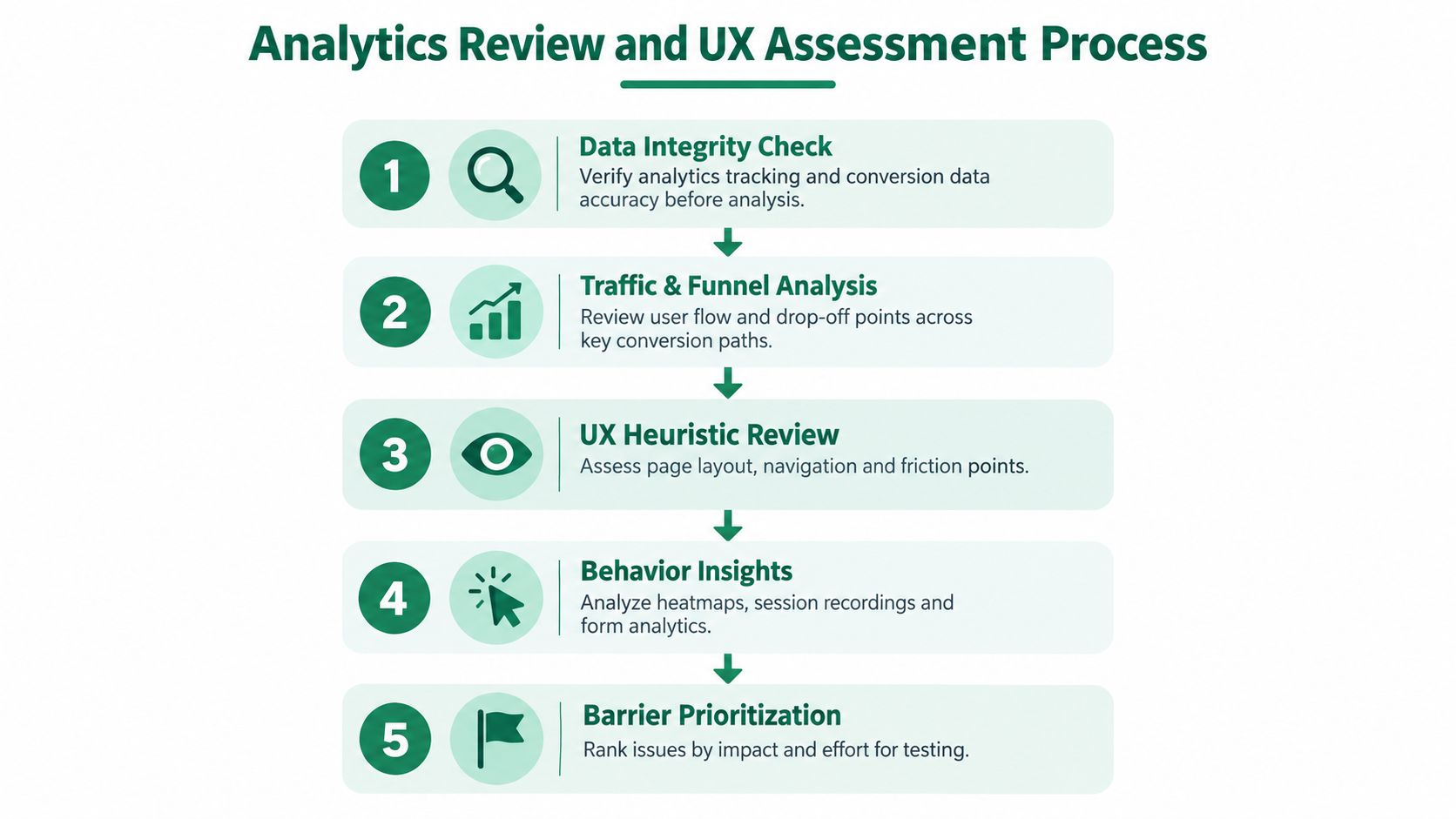
Start with measurement checks that affect decisions
For local businesses, bad tracking creates false winners. I see it constantly with location pages that appear to outperform because one event fires on page refresh, another misses iPhone tap-to-call clicks, and booked appointments live in a separate system nobody reconciles.
Run a basic validation pass first:
- Check event firing rules: Primary conversion events should trigger once per completed action, not on reloads, thank-you page revisits, or form errors.
- Reconcile GA4 with the CRM or scheduler: Pull a 7 to 14 day sample. Compare submitted forms, qualified leads, booked appointments, and spam by page and by source. If GA4 shows 25 leads from a location page and the CRM shows 11 usable records, the audit has a tracking or lead-quality problem to fix before any UX judgment.
- Review consent mode and call tracking setup: Inconsistent consent behavior and misconfigured number swapping can distort channel performance, especially on mobile.
- Remove known noise: Internal traffic, spam referrals, and bot sessions still slip into small business accounts and can skew page-level conversion rates.
Google's own guide to conversion events in GA4 is a better reference point here than another generic CRO checklist because it helps teams verify whether they are marking the right actions as conversions in the first place.
Segment by visitor intent, not just by channel
Once measurement is clean enough to trust, split the page's performance into groups that reflect how people arrive and decide.
Review at least these cuts:
- Device type: Local page friction often shows up on mobile first.
- New versus returning visitors: Returning visitors may be ready to call. First-time visitors often need proof and service clarity.
- Traffic source: Branded, map-driven, paid, traditional organic, and referral traffic behave differently.
- Landing context: A visitor entering on a city service page has different expectations than someone coming from the homepage.
AI-referred and conversational search traffic needs its own review. Visitors arriving from ChatGPT, Perplexity, Gemini, or browser assistants often skip the research phase that traditional organic traffic still goes through. They tend to land with a narrower question, scan faster, and look for confirmation that the business serves their exact location, problem, and timeframe. If those sessions have lower page depth but stronger call or form intent, that is not always a UX failure. It can mean the page answered the question quickly. If they bounce after reading the hero and service area copy, the page may lack the precise proof those AI-influenced visitors expected.
Teams that already produce SEO reports for local teams should add this traffic segmentation early, because blended reporting hides whether conversational search users behave more like branded traffic or like first-touch discovery traffic.
Assess UX like an operator
After segmentation, review the page in the order a buyer experiences it.
| Review area | What to check on a location page |
|---|---|
| Message match | Does the headline confirm the service, city, and urgency implied by the query or referral context? |
| Local proof | Are reviews, photos, staff details, credentials, and service area specifics visible without scrolling forever? |
| Primary action | Is the main CTA obvious, usable on mobile, and consistent with the visitor's likely intent? |
| Friction points | Do forms ask for too much, do click-to-call buttons work, and do maps or directions interrupt the lead path? |
| Next-step clarity | Does the page explain what happens after the call or form submission, including response time and coverage? |
Good UX review for local pages is operational, not decorative. A page can look polished and still underperform because the phone number is hard to tap, the form asks for insurance details too early, or the page buries service-area limitations until after the user clicks.
For teams that want a more disciplined experimentation workflow after the review, this resource on building a conversion hypothesis is a useful companion.
Testing Methods That Deliver Measurable Gains
Once you've identified friction, testing becomes the filter between a good idea and a proven improvement. Local businesses often waste effort. They test too many elements at once, choose pages with weak traffic, or run experiments on changes that should have been fixed outright.

What to test and what to just fix
Not every issue needs an experiment.
Fix these immediately if you find them:
- Broken actions: Click-to-call links that fail, dead forms, misrouted bookings
- Mobile friction: Overlapping buttons, unreadable text, hard-to-use date pickers
- Trust gaps: Missing core business details, unclear hours, weak service area clarity
Test these instead:
- Headline framing: Local relevance versus service urgency
- CTA wording: “Book now” versus “Request appointment”
- Trust placement: Reviews near the hero versus near the form
- Form structure: Short first-step form versus full intake form
Why simple tests outperform clever ones
For local sites, A/B tests usually beat multivariate tests. Traffic is often too limited to split across many versions without creating more noise than insight. Small teams do better when they isolate one meaningful variable and watch the right outcome.
Baymard's checkout research is a useful reminder of how much value can sit inside friction removal. It states that a large-sized ecommerce site can increase conversion rate by 35.26% solely through better checkout design, based on years of checkout testing and benchmarking, according to Baymard's checkout usability benchmark. Local sites aren't ecommerce checkouts, but the lesson holds. Removing friction usually beats cosmetic redesign.
Field note: The strongest winning tests on local pages are rarely dramatic. They're usually clearer service-area language, tighter CTAs, shorter forms, and better mobile placement.
A workable local testing sequence
Use a sequence like this:
- Choose one page with enough meaningful traffic. Don't spread your first test across every location.
- Write one hypothesis tied to one action. Example: clearer city-specific trust copy may increase booking starts.
- Hold the rest of the page steady. If you change layout, offer, CTA text, and proof all at once, you learn nothing.
- Measure primary and secondary effects. Sometimes a test lifts calls but reduces form submissions.
- Roll out by pattern, not by assumption. What wins on one city page may fail on another.
If your team needs more examples of local conversion fixes worth testing, this guide on how to improve conversion rates is a practical next step.
Local-Specific CRO Tactics and Real Examples
General CRO advice breaks down fast on location pages because local intent is messier than national traffic. Someone searching for a nearby dentist, HVAC repair company, or med spa isn't evaluating a brand in the abstract. They're checking distance, trust, speed, and fit.
That changes how a conversion optimization audit should interpret user behavior.
Example one, the page ranks but the leads are weak
A city page for a home service business may attract the right keywords but still produce poor lead quality. In many cases, the issue isn't the traffic volume. It's that the page sounds like a templated SEO asset rather than a real local service page.
The fix is often operational, not decorative:
- Add neighborhood or service-area specificity where it helps comprehension.
- Make response expectations visible.
- Place local proof near the first CTA, not buried lower on the page.
- Reduce generic stock language that could belong to any city page.
Example two, map intent and contact intent are different
A location page for a clinic or retail business often serves two distinct visitors. One wants directions. The other wants reassurance before calling.
Those visitors shouldn't be pushed through the same path. A map embed, parking details, and hours help the first group. Reviews, provider credentials, insurance details, or service summaries help the second. When both are crammed together with equal visual weight, the page gets harder to use.
Local pages work better when they separate “help me get there” from “help me decide.”
Example three, AI-referred traffic needs its own logic
This is the emerging blind spot. Recent benchmark coverage reports that AI-referred traffic conversion rates rose 55% year over year to 1.3%, which suggests the channel behaves differently and shouldn't be blended into site-wide reports, according to Contentsquare's digital experience benchmark commentary.
For local businesses, that matters because AI and conversational search visitors often arrive with compressed intent. They may ask a tool for “best family dentist near me open late” or “same-day garage door repair in my area.” When they land on your page, they expect direct confirmation, not generic SEO copy.
That means your audit should review AI-referred traffic separately and ask different questions:
| Traffic type | What to audit |
|---|---|
| Traditional organic | Keyword intent match, page depth, internal path |
| AI-referred traffic | Direct answer quality, trust confirmation, fast CTA access |
| Map or local listing traffic | Directions, hours, proximity, call action |
The pages that convert this traffic best usually feel more explicit. They answer the query faster, remove extra navigation decisions, and confirm local fit early.
Building Your Audit Action Plan and Tool Stack
Monday morning, the owner asks why booked appointments are down. Analytics shows conversions holding steady. The call log says otherwise.
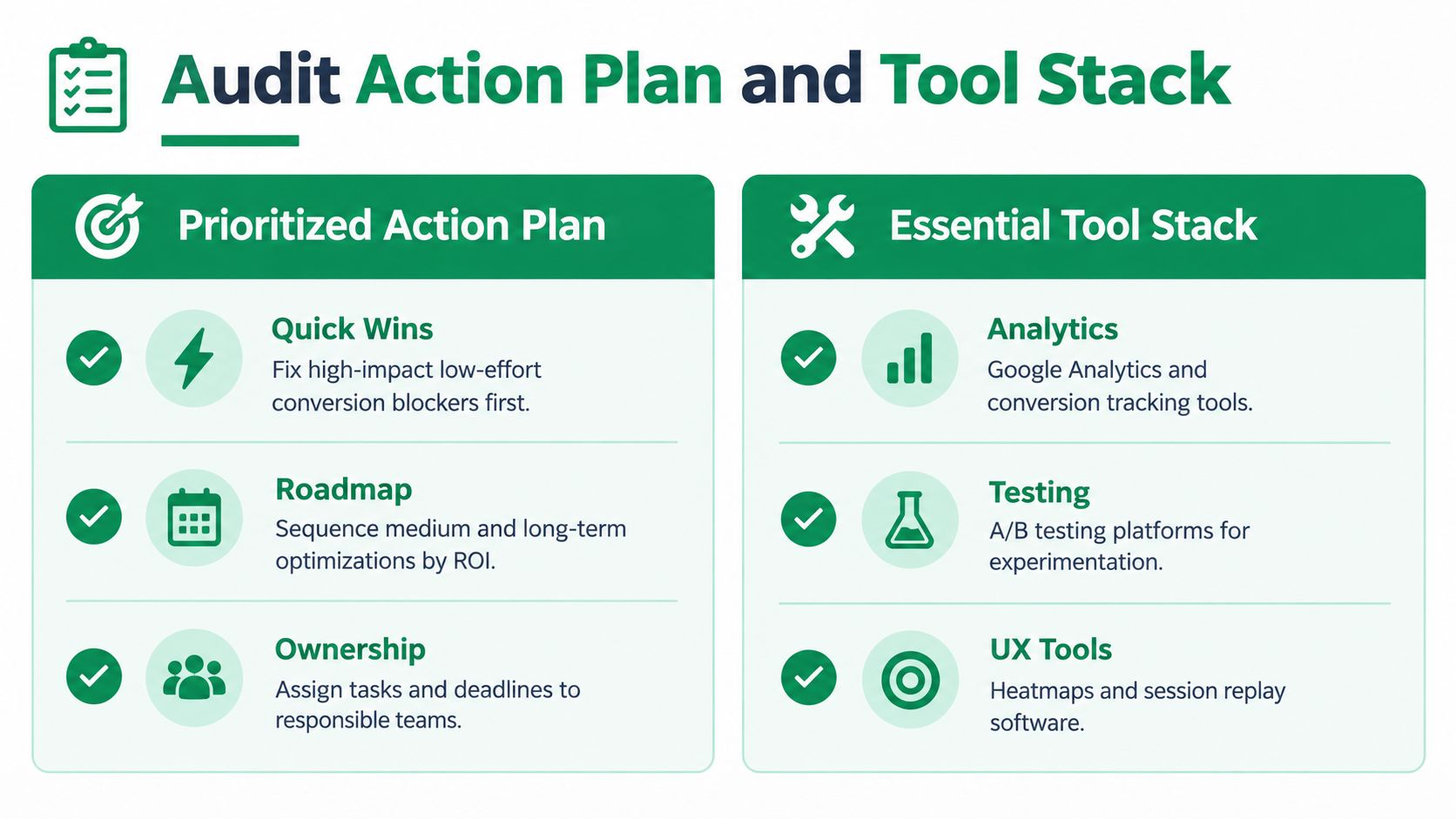
That gap is why the action plan matters more than the audit document. A local business does not need 20 observations with no order, no owner, and no decision on what gets fixed first. It needs a short list tied to business risk, because dev time is limited, approvals are slow, and someone is also handling reviews, listings, ads, and the website.
Prioritize by measurement risk first, then upside
I use a four-part order because it prevents teams from testing on bad inputs.
-
Data integrity fixes
- Broken event tracking
- Duplicate conversions
- Consent or attribution confusion
- CRM mismatch
-
Immediate UX blockers
- Mobile CTA problems
- Dead forms or call links
- Missing trust details
- Hard-to-find location info
-
Message and page structure
- Unclear local relevance
- Weak CTA hierarchy
- Generic proof
- Overloaded page sections
-
Test backlog
- Headlines
- CTA copy
- Form length
- Trust placement
- Layout changes
Teams skip step one all the time. They debate headlines while form submissions fire twice, phone clicks go untracked, or offline bookings never make it back into the CRM. That creates false winners and wasted sprints.
For local businesses, this problem gets worse once AI-referred traffic enters the mix. Those visits often arrive with narrower intent and shorter paths to action, so sitewide conversion averages hide what is happening. Keep AI referrals, traditional organic, map traffic, and direct returning visits in separate views before you rank opportunities. Otherwise a page can look stable in aggregate while underperforming for the traffic segment with the highest buying intent.
Build a lean tool stack
A useful stack answers three questions. What happened, why did it happen, and did the fix improve qualified leads?
A practical setup often includes:
- Analytics platform: For traffic source, device, and conversion segmentation
- Session replay or heatmap tool: For friction analysis on location pages
- Form or call tracking layer: For lead verification
- Testing platform or controlled deployment process: For structured experimentation
- CRM or scheduling system: For validating real outcomes against reported conversions
I would add one filter that many small teams miss. Choose tools that let you isolate traffic by landing page and referral source, including AI assistants and conversational search platforms when they appear in referrer data or campaign tagging. If the tool stack cannot separate those visits, the audit turns into guesswork.
If you're assembling tools specifically for local marketing workflows, AI Tools for Local SEO maintains a directory with a category for conversion optimization for local traffic, along with adjacent categories for analytics, reporting, and multi-location operations.
Turn findings into ownership
An action plan fails when every item belongs to "marketing." Audits get implemented when each fix has one owner, one deadline, and one success check.
| Audit area | Owner question |
|---|---|
| Tracking | Who verifies the event and CRM match? |
| Mobile UX | Who can fix the page issue this sprint? |
| Local trust content | Who gathers reviews, photos, or credentials? |
| Testing | Who approves hypotheses and monitors results? |
I also recommend adding one more column internally: validation method. For example, a tracking fix is not done when the tag fires. It is done when the event matches the form platform, the call log, and the CRM for a defined period. That sounds stricter, but it prevents the common local reporting problem where dashboards improve and booked jobs do not.
Re-run the audit after meaningful shifts in traffic mix, page templates, lead routing, or reporting setup. Local sites may change slowly, but attribution quality and visitor behavior change faster than many owners realize.
A strong conversion optimization audit starts with trusted measurement, then moves into page friction, then tests message changes. That order is less exciting than headline tests. It also gets better decisions.