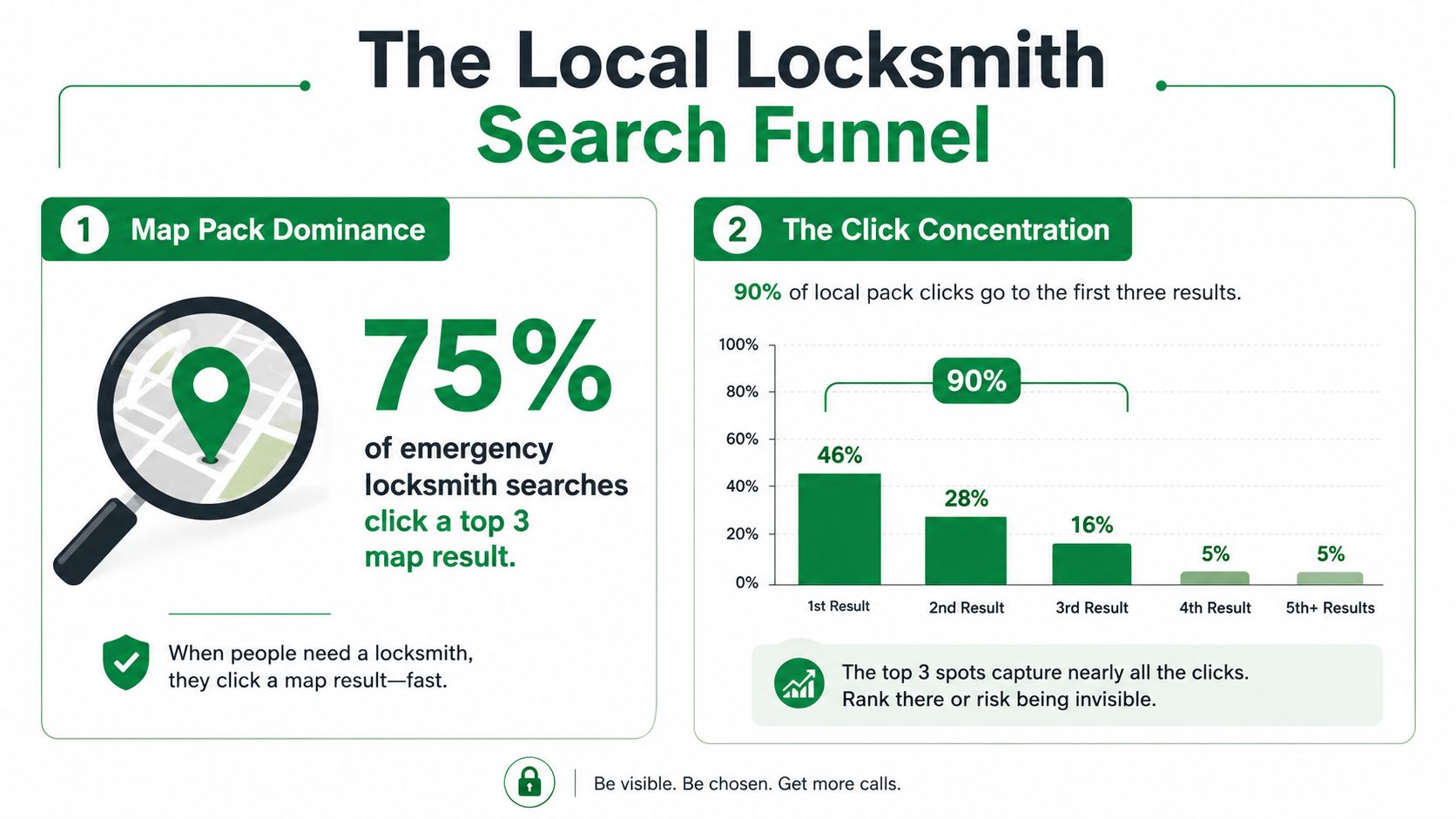
About 42% of local searches end with a click on a Google Map Pack listing, and approximately 93% of those clicks go to the top three results (Webtonic's locksmith local SEO data). For a locksmith, that changes the entire SEO conversation. You're not competing only for a blue-link ranking. You're competing for the few map positions customers see when they're locked out, stranded beside a car, or trying to secure a property quickly.
The practical question isn't, “How can I publish more city pages?” It's, “Which job is this customer trying to solve, how urgent is it, and does my Google presence make calling me effortless?” That intent-first approach is the foundation of SEO for locksmiths that produces booked work instead of empty traffic.
Why Local Search Decides Your Locksmith Lead Flow
The Map Pack dominates locksmith discovery because the searcher usually needs a provider, not an article. Someone typing “locksmith near me” wants location, phone number, availability, reviews, and a clear path to contact. An industry compilation reports that this phrase generates more than 1 million monthly searches in the United States, with related locksmith terms adding substantial demand (Webtonic's locksmith local SEO statistics).
That demand is heavily concentrated. If roughly 93% of Map Pack clicks go to the first three listings, a business sitting in position four may technically be visible but practically overlooked. The problem gets sharper for emergency searches, where a customer often chooses a credible option quickly rather than comparing every company in the market.
The ranking system is local, not purely organic
Google's local ranking system centers on relevance, distance, and prominence. Those factors explain why a beautifully written national service page may fail to generate calls while a well-maintained Google Business Profile wins nearby searches.
- Relevance means your categories, services, website content, and profile details match the job being searched.
- Distance reflects the relationship between the searcher, the stated service area, and the business location.
- Prominence grows through signals such as reviews, local references, links, and recognizable business information.
A locksmith can't control every searcher's location, and no ethical tactic can manufacture proximity. You can control whether Google understands that you handle emergency lockouts, automotive work, residential rekeying, or commercial access systems.
Practical takeaway: Treat the Map Pack as the primary storefront. Your website supports it, but it doesn't replace a complete, trusted, service-specific local presence.
What deserves attention first
Start with the assets closest to the call. Claim and complete the Google Business Profile. Correct inaccurate listings. Build pages for the actual services you perform. Make the phone number prominent on mobile. Then develop reviews and local authority.
Generic “locksmith in [city]” pages can have a place in a larger architecture, but they shouldn't be the campaign's central strategy. Thin pages that swap one neighborhood name for another give customers little useful information and give search engines little reason to rank them. A page about emergency home lockouts in a specific service area is stronger when it includes real coverage details, response expectations, access instructions, trust signals, and a direct call option.
Mapping Locksmith Keywords by Job Type and Urgency
Keyword research becomes useful when it mirrors the way locksmith customers describe a problem. A broad list of terms isn't a strategy. A page map is.
Separate searches into two dimensions: job type and urgency. Job type identifies what the technician must do. Urgency indicates how quickly the customer expects help. This prevents an emergency lockout page from competing with a planned smart-lock installation page, even though both involve locks.
Build the map around real jobs
Create a working spreadsheet with four columns: customer wording, job type, urgency, and destination page. Useful clusters include:
- Emergency residential: emergency locksmith, locked out of house, door lockout, after-hours lockout.
- Emergency automotive: car locksmith, car lockout service, lost car keys, mobile car key help.
- Planned residential: rekeying, lock repair, deadbolt installation, smart-lock installation.
- Planned commercial: commercial locksmith, master-key planning, access hardware, office lock repair.
The exact wording varies by market, but the architecture should reflect your call logs. Review missed-call transcripts, technician notes, and customer questions. If callers repeatedly say “keys locked in car,” that language belongs in the automotive cluster even if your preferred marketing term is “vehicle lockout service.”
Emergency service pages should lead with action. Put the service area, phone number, operating availability, and next step near the top. Planned-service pages can spend more time on options, compatibility, security considerations, and maintenance.
A high-intent keyword research workflow can help cluster phrases by problem and buying stage, but automation shouldn't decide your page structure without human review. A tool can group similar language. You still need to verify that each group represents a distinct service and not several ways of describing the same job.
Avoid the thin “near me” trap
“Near me” is usually a modifier, not a reason to create dozens of near-identical pages. A customer searching locally still needs proof that you serve the area and perform the requested work. Build one strong service page first, then create a location page only when you can add local information, such as coverage boundaries, nearby commercial districts, service limitations, technician availability, or relevant customer questions.
Use internal links to connect the architecture:
- The homepage links to major service hubs.
- The emergency hub links to residential and automotive emergency pages.
- Service pages link to legitimate location pages.
- Helpful answers link back to the service that solves the problem.
Add appropriate structured data so search engines can interpret the business, service, location, and frequently asked questions. Schema doesn't make weak content valuable, but it can clarify direct answers when the page already provides accurate, readable information.
Optimizing Your Google Business Profile and Local Citations
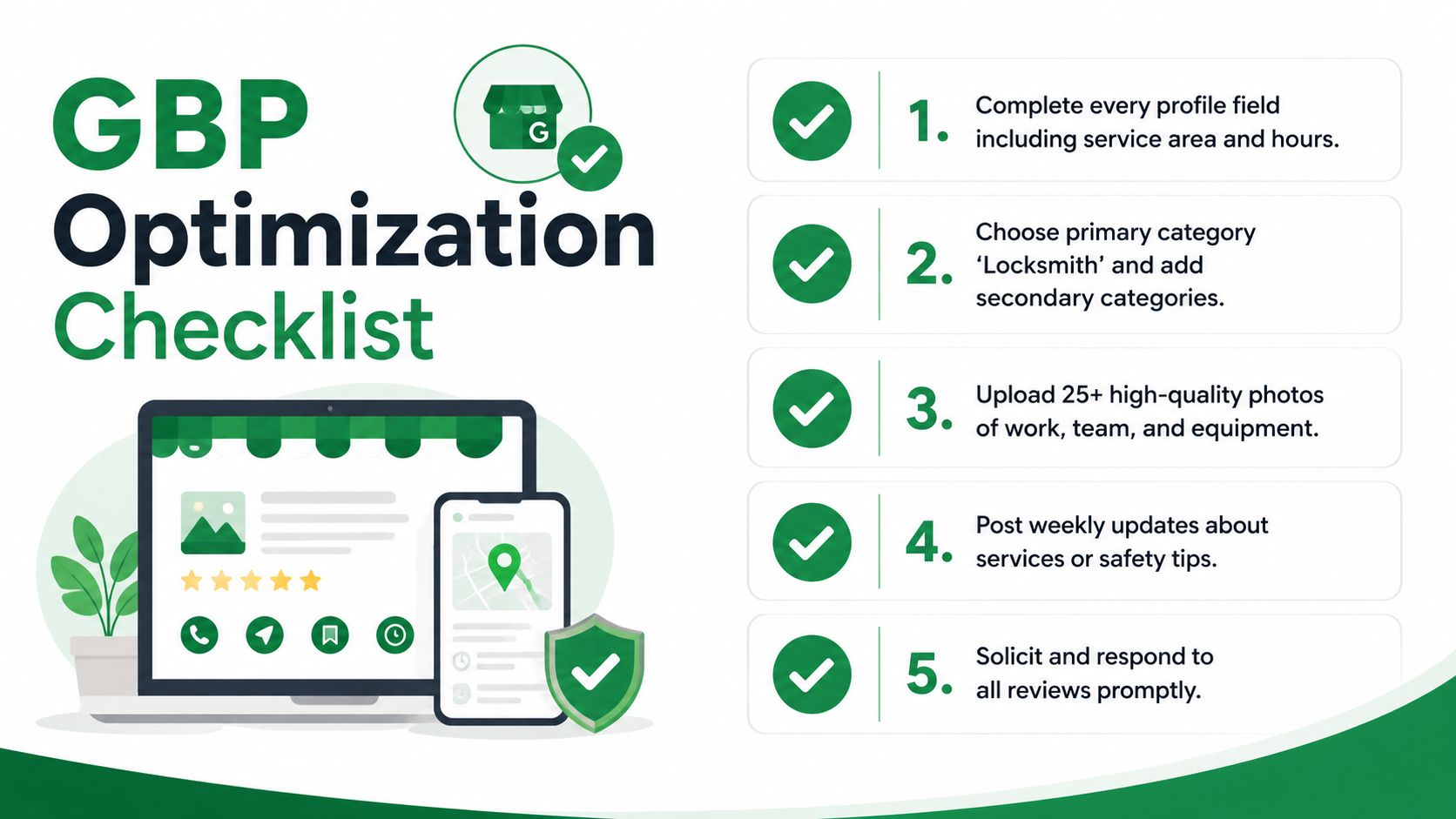
A locksmith's Google Business Profile is not a form to complete once and forget. It's a relevance and trust asset that needs accurate service information, clear operating details, and ongoing customer activity.
Google's local framework prioritizes relevance, distance, and prominence. Your profile supports relevance when it accurately describes the services you provide. Citations support consistency. Reviews and local links help establish prominence. None of these elements replaces the others.
Complete the profile as a customer would
Work through the profile from the perspective of a person under pressure.
- Business identity: Use the business name and keep branding consistent.
- Primary category: Select the category that best represents the core locksmith operation.
- Services: Add the actual services you sell, including emergency, automotive, residential, and commercial work where applicable.
- Service area: Define the territory you cover. Don't claim distant places you can't serve reliably.
- Hours: Keep regular and emergency availability accurate. Incorrect hours create missed calls and poor customer experiences.
- Website and phone: Make both fields functional, current, and consistent with the website.
- Photos: Show technicians, vehicles, tools, equipment, storefronts, and completed work where privacy and safety permit.
Secondary categories should describe real parts of the operation, not every adjacent service you'd like to appear for. Category stuffing can dilute relevance and create expectations your team can't meet.
Make citations boringly consistent
Your name, address or service-area details, and phone number should match across major directories, supplier profiles, chambers, associations, and local references. Fix old phone numbers and duplicate records before spending time on low-value directory submissions.
For a practical framework on auditing business listings, review this guide to listings optimization for local SEO. The important principle is consistency, not collecting every possible citation.
Top-three reality: A complete profile is the entry requirement. It doesn't guarantee a top-three position, but an incomplete or inaccurate profile makes relevance and trust harder to establish.
Use Google Business Profile verification guidance and keep ownership details organized, especially when staff, agencies, or locations change (Google Business Profile verification resource). Then build a review process that asks customers for honest feedback after completed work and responds professionally to both positive and negative comments.
Building Service and Location Pages That Rank and Convert on Mobile
Emergency locksmith websites often fail at the exact moment they're needed. The page may rank, but the phone number is buried, the design loads slowly, or the visitor can't tell whether the technician serves their location.
A technical SEO report places 60% to 64% of emergency locksmith searches on mobile, with locked-out searches rising above 80% (Webtonic's locksmith technical SEO statistics). Design for the phone in the customer's hand, not the desktop monitor in an office.
Put the call path above the fold
The first screen should answer four questions:
- Do you handle this exact problem?
- Do you serve this location?
- Can I reach you now?
- Why should I trust you?
Use a persistent tap-to-call control, a short service statement, service-area proof, and a trust signal such as verified reviews, licensing information where relevant, or a clear description of the technician process. Don't force an emergency customer through a long form before showing the phone number.
Speed matters because delay creates abandonment. The technical report cited above states that bounce rate rises 32% at 3 seconds, 90% at 5 seconds, and 123% at 10 seconds compared with a 1-second baseline, while conversion falls by roughly 7% for each additional second of load time (Webtonic's locksmith technical SEO statistics). Keep images compressed, limit unnecessary scripts, avoid JavaScript-heavy location templates, and make core content available in crawlable HTML.
Give each service a distinct job
Create separate pages when the customer's problem, technician process, or conversion path differs:
- Emergency locksmith: immediate lockouts, response area, call instructions, and urgent FAQs.
- Automotive locksmith: vehicle access, key replacement, programming, and relevant limitations.
- Residential locksmith: rekeying, repairs, installations, and home security options.
- Commercial locksmith: offices, property managers, access systems, and planned maintenance.
A location page should add local substance rather than repeat the service page with a city name replaced. Use natural internal links between the service hub, location pages, and relevant answers. Add LocalBusiness, Service, and FAQ schema where the page content supports it.
For broader guidance on connecting search strategy with business demand, CrowdTamers' perspective on B2B demand gen with SEO insights offers useful context, even though locksmith pages require a faster, more call-focused experience.
Turning Reviews Local Content and Links Into Lasting Prominence
Prominence grows when customers, local organizations, and your own website repeatedly confirm the same story: you provide a specific locksmith service in a defined area, and people trust you to complete it.
Reviews are the customer-facing layer. Ask for feedback after the job, make the request easy to complete, and respond without using copied language for every customer. A response should acknowledge the job type and location when the customer has already mentioned them, but never expose private details about a home, vehicle, access code, or security issue.
Use review sentiment analysis for local businesses to identify recurring complaints and strengths. If customers repeatedly praise fast communication but criticize unclear arrival windows, that insight belongs in the website copy and the dispatch process, not only in a dashboard.
Publish answers that support emergency decisions
Useful local content doesn't need to become a high-volume publishing machine. It should answer questions customers ask.
- What should I do after locking keys in a vehicle?
- How can I prepare for a residential rekey?
- What information should a property manager provide before commercial service?
- Which areas does the mobile team cover?
- What should customers verify before allowing a locksmith to begin work?
Keep answers direct, safe, and operational. Avoid instructions that could help someone bypass a lock or enter property without authorization. Link each answer to the relevant service page and place a clear contact option nearby.
Earn local references with a reason
Local links work best when they reflect a real relationship. Consider property managers, real estate professionals, neighborhood organizations, hardware suppliers, community safety initiatives, business associations, and local publications. Offer useful material such as a lockout-prevention checklist or a seasonal property-security briefing, rather than requesting a link with no relevant reason.
The strongest flywheel is simple: customer feedback improves the service page, useful pages earn local attention, and better service experiences create more honest reviews. Quantity alone won't rescue weak relevance or poor follow-up.
Tracking Results and Scaling With Smarter Workflows
Rankings matter, but a locksmith shouldn't judge SEO from a single average position. Local visibility changes by searcher location, device, service, and urgency. Track the queries and areas that reflect the jobs you want.
A useful reporting system combines:
| Metric | What it reveals |
|---|---|
| Map Pack visibility | Whether the profile appears for emergency, automotive, residential, and commercial searches across target areas |
| Calls and qualified contacts | Whether visibility turns into real conversations |
| Review activity | Whether the reputation process is active and whether customers mention useful service details |
| Booked jobs | Whether calls become revenue-producing work |
| Close rate | Whether the lead quality and dispatch process support growth |
Track service areas separately where possible. A profile may perform well for residential lockouts near the business while remaining weak for automotive searches in a farther suburb. That difference tells you whether the problem is proximity, service relevance, local authority, or operational coverage.
Use automation without outsourcing judgment
AI tools can cluster search terms, draft content outlines, identify review themes, monitor listing discrepancies, and assemble recurring reports. They shouldn't invent services, fabricate local experience, or publish generic city pages without review.
A business owner or agency can compare rank trackers, citation platforms, technical crawlers, call tracking, and reporting tools. AI Tools for Local SEO is one directory that organizes options across categories such as keyword research, Google Business Profile optimization, listings, reviews, technical audits, rank tracking, reporting, and automation.
A practical 30-day sequence
Days 1 through 7: Audit the Google Business Profile, correct core business details, verify service categories, and test every phone and website link.
Days 8 through 14: Map emergency and planned services by job type. Build or revise the highest-intent pages, starting with emergency residential and automotive work if those calls drive the operation.
Days 15 through 21: Improve mobile speed, place tap-to-call controls where customers can see them, remove crawl barriers, and connect related pages with descriptive internal links.
Days 22 through 30: Start a consistent review request process, repair important citation errors, contact relevant local partners, and establish a dashboard for Map Pack visibility and booked calls.
Don't leave the GBP website field empty, neglect review follow-up, or measure success through impressions alone. The objective is dependable visibility for profitable jobs, followed by a fast and trustworthy path from search to conversation.
If your locksmith business is buried below the top local results, start with an intent and visibility audit rather than publishing another generic city page. Review your Google Business Profile, map emergency and automotive services, test the mobile call experience, and create a 30-day plan tied to qualified calls and booked jobs.