The most common advice about missing Google reviews is to wait a few days and contact support. That advice is incomplete. A review can be delayed, but a sudden disappearance often reflects automated policy filtering or retrospective anti-fraud enforcement, not a harmless display glitch or a customer changing their mind.
Treat the problem like a forensic investigation. First establish whether the customer submitted the review. Then determine whether Google is processing it, filtering it individually, or restricting activity across the profile. Only after that should you contact support, and your evidence should describe a pattern rather than report a lower rating.
Why Your Google Reviews Are Disappearing
Google reviews don't pass through a simple publishing system. Google evaluates contributions for spam, fake engagement, inappropriate content, and other policy violations before or after they appear in Search and Maps. That means a review may never become visible, may appear temporarily, or may disappear after a later review of the account and submission pattern.
Google's enforcement activity shows why assuming a technical glitch is risky. During 2024, Google blocked or removed more than 240 million policy-violating reviews, and the vast majority were removed before users saw them, according to Google's 2024 content safety reporting. The figure was approximately 40% higher than the previous year, which indicates a substantial expansion of detection and enforcement.
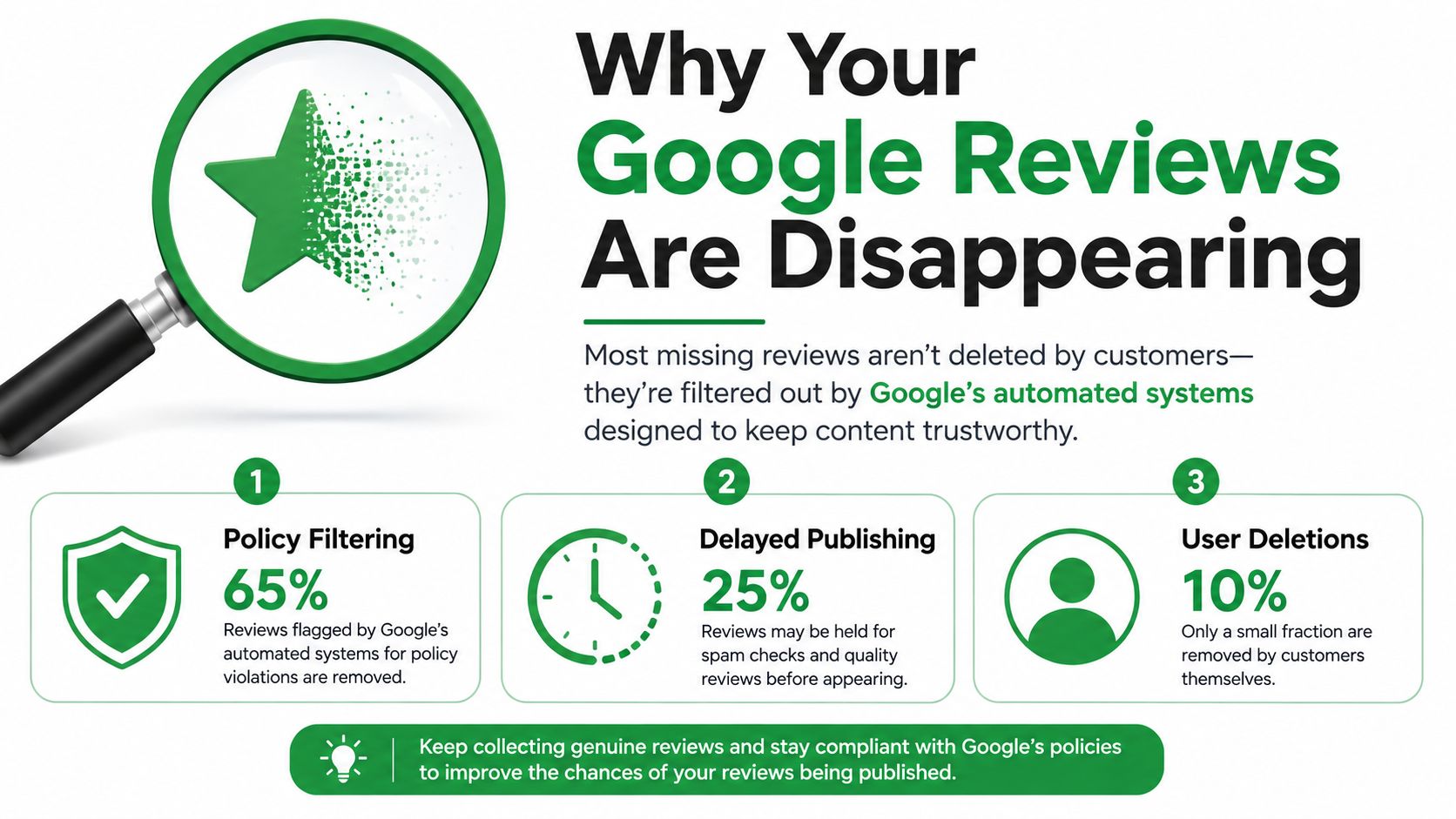
Three different problems look identical
A customer might start writing a review but never complete submission. In that case, there isn't a published review to recover. A legitimate submission may also remain invisible for several days while Google checks it, particularly if the account, device, location, or activity pattern requires additional review.
Permanent removal is different. Google says policy-violating reviews aren't restored, although a business can contact support if it believes a legitimate review was removed incorrectly. Profile mergers can create another delay, because Google may need time to transfer reviews from one listing to another.
Practical rule: Don't describe every missing review as “deleted.” First label it as unsubmitted, delayed, individually removed, or part of a broader profile event.
Retrospective enforcement deserves particular attention. Google can reassess reviews after publication when later signals suggest coordinated or manipulated activity. A review that was visible for weeks or months can therefore vanish after Google examines the way several reviews were acquired, not because the customer personally deleted it.
For a useful explanation of the wider Google reviews disappearing mystery, compare the review's timing with changes affecting the whole profile. A separate guide to Google rating and review management can also help you place review visibility inside a broader local SEO workflow.
Common Triggers for Review Removal and Delays
Legitimate customers don't guarantee compliant submissions. Google's systems look at the surrounding signals, and ordinary business processes can accidentally create patterns that resemble manipulation.
The clearest risks involve incentives and coordination. A discount, gift, contest entry, or other reward tied to leaving feedback can make a review appear influenced. Asking employees, relatives, or people with a business relationship to review the company creates a conflict of interest. Reusing the same wording across locations or sending customers through a tightly controlled campaign can also make authentic experiences look copied or organized.
Google's Business Profile review troubleshooting guidance specifically identifies incentivized reviews, repeated or duplicated text, reviews posted from the business's Wi-Fi network, unusual surges, and suspicious reviewer or IP activity as enforcement-related examples.
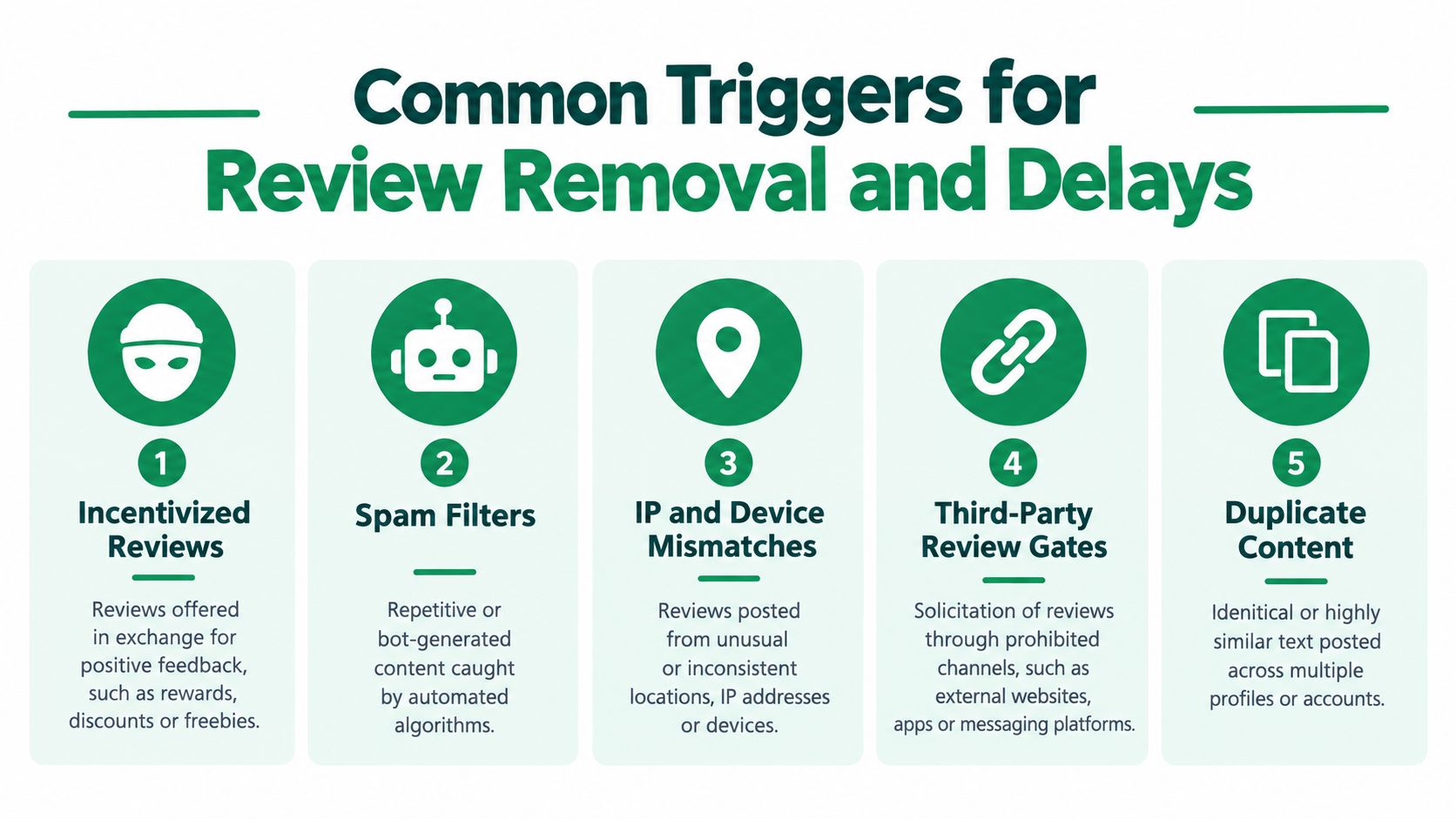
Operational patterns that deserve an audit
Look at the acquisition process, not just the missing text.
- Business-network submissions: Customers who post while connected to the company's Wi-Fi may create a concentration of reviews from one network.
- Sudden review surges: A campaign, event, or bulk message can produce clustered submissions that differ sharply from the profile's normal rhythm.
- Repeated wording: Templates that customers copy too closely can resemble duplicate content, even when the underlying experiences are real.
- Reviewer relationships: Staff, owners, family members, and connected businesses shouldn't post endorsements.
- Technical delays: Profile mergers can postpone review transfers, while older phones or outdated software can prevent customers from completing submission.
Google may also temporarily disable user-generated content for a particular Business Profile or business category. That situation looks different from isolated filtering because new reviews stop publishing broadly.
Businesses investigating cleaning up fake Google reviews should separate reviews that violate policy from legitimate reviews that merely disappeared. Reporting suspicious content is one task. Proving that compliant customer feedback was removed is another, and mixing the two can weaken the support case.
Diagnosing the Scope of the Review Loss
Start with a snapshot before changing anything. Record the current review count, average rating, profile URL, and Business Profile ID. Then list each missing review with the reviewer's name, date, star rating, text or screenshot, and the date it was last visible.
Next, test the profile with an independent new review, if one is naturally received. Don't ask a customer to repost an old review or change its wording for the purpose of testing. The result helps classify the event:
| Observation | More likely explanation |
|---|---|
| One review is absent while new reviews publish normally | Individual filtering, delayed visibility, or a reviewer-level issue |
| Several reviews sharing similar signals disappear | Review-level filtering based on a common acquisition pattern |
| New reviews don't publish at all | Profile-level or category-level restriction, or a broader platform issue |
| Reviews vanish after a listing merger | Transfer or processing delay |
| The count changes while the visible review list behaves differently | A display or indexing inconsistency requiring closer documentation |
Compare the missing reviews as a group
Google says its systems combine machine-learning detection with human review. The most useful investigation therefore looks for shared indicators rather than treating every disappearance as random. Google's contribution policy guidance supports examining suspicious-user-activity signals and escalating cases that automation can't resolve.
Review these fields in a simple spreadsheet:
- Account history: Is the reviewer's profile active and established, or nearly empty?
- Language patterns: Do several reviews repeat unusual phrases or sentence structures?
- Submission timing: Did multiple reviews appear at nearly identical times?
- Location and network: Are reviewers concentrated around one device, site, or network?
- Acquisition route: Did the reviews follow an incentive, review gate, kiosk, or bulk solicitation campaign?
These indicators don't prove wrongdoing. They show Google what may have caused the filter and help you identify an internal process that needs to stop.
Avoid drawing conclusions from the rating alone. A lower rating can result from removed positive reviews, removed negative reviews, or a recalculation after the review count changes. Your evidence should state exactly what disappeared, when it disappeared, and whether publishing continues.
Building Your Case for Google Support
Support agents can't investigate a vague complaint efficiently. “Our rating dropped” doesn't identify the affected content, the relevant listing, or the timeline. A concise evidence package gives Google something specific to check.
Preserve the record before requesting action
Use a dated evidence log. Google's official missing-review troubleshooting process supports documenting the profile and the individual reviews involved.
Include:
- Profile identity: Business Profile ID, profile URL, current review count, and current rating.
- Review details: Reviewer name, publication date, star rating, full text, and any response previously posted.
- Visibility history: The date you last saw the review and where it was visible, such as Search, Maps, or the reviewer's contribution history.
- Pattern evidence: Whether other reviews disappeared at the same time and whether new reviews are still publishing.
- Process context: Any recent merger, campaign, agency change, incentive, or unusual submission activity.
Screenshots matter because the visible profile may no longer preserve the content you need to identify. Save the original image, not just a cropped rating summary. If a customer has their own screenshot, add it to the same dated record.
Submit one structured escalation
Use Google Business Profile Help and select the missing-review route. Write a short timeline in plain language:
- The review was visible on a specific date.
- It was absent by a later date.
- The reviewer, rating, and text are documented.
- Other reviews are or aren't publishing.
- You found no incentive, conflict, duplicate wording, or coordinated submission pattern, if that is accurate.
Don't flood support with repeated tickets. Multiple versions of the same request can fragment the case and make the timeline harder to follow.
What wastes time: Reposting the identical review, asking the customer to edit it until it passes, or creating several near-identical support requests.
Google requires reviews to represent genuine, unbiased experiences. Asking customers to alter wording can create another duplicate or coordinated-activity signal. Preserve the original evidence first, and don't promise a restoration outcome. Google doesn't publish a guaranteed resolution time or official restoration rate.
If you need to distinguish legitimate recovery from improper deletion requests, review the separate guidance on deleting Google Business reviews. The objective here is to document a potentially incorrect removal, not to manipulate the review record.
Auditing Your Review Acquisition Strategy
A support request won't fix a process that keeps producing suspicious signals. If your team asks every customer for feedback through the same script, device, network, and timing pattern, new reviews may continue to disappear even after an individual case receives attention.
The audit should begin with the question, could an uninformed reviewer interpret this process as coordinated? That standard is more useful than asking whether every customer was real. Real customers can still submit content through a prohibited or high-risk workflow.
Google's transparency reporting says it removed 221 million fake or misleading reviews in 2025 and may impose profile restrictions when a business violates its fake-engagement policy, as reported in its Maps content protections data. The risk therefore extends beyond losing individual reviews. A profile can attract broader scrutiny when historical acquisition practices create a consistent pattern.
Remove the risky mechanisms
Audit every channel, including agency instructions that local managers may not know about.
- Incentives: Stop rewards tied to positive sentiment or review submission.
- Review gating: Don't ask only happy customers to review publicly while routing unhappy customers elsewhere.
- Templates: Give customers a neutral invitation, not prewritten praise to copy.
- Shared devices: Let customers use their own accounts and devices rather than a reception kiosk.
- Staff participation: Exclude employees, owners, relatives, and connected businesses.
- Bulk outreach: Spread requests through normal customer interactions instead of concentrating submissions after one message or event.
- Multi-location campaigns: Check for identical scripts, wording, devices, or timing across branches.
A compliant request can invite an honest review without prescribing the rating, sentiment, length, or language. It should explain where to leave feedback and make clear that the business values an accurate experience, including criticism.
Tools can help you redesign the customer-feedback experience without turning it into a pressure campaign. For example, teams can browse Formbricks survey templates for ways to collect structured feedback, then ensure any public-review invitation remains neutral and policy-compliant.
Don't delete internal records of an old campaign. Preserve the scripts, incentive terms, landing pages, and agency instructions so you can explain the timeline if Google asks. Correct the process, document the correction, and stop requesting replacement reviews from customers whose original submissions vanished.
Implementing Ongoing Reputation Monitoring
A review profile needs a ledger, not occasional attention after a rating drop. Weekly monitoring lets you distinguish normal customer activity from a sudden visibility event and gives you contemporaneous evidence before anyone has to reconstruct the history from memory.
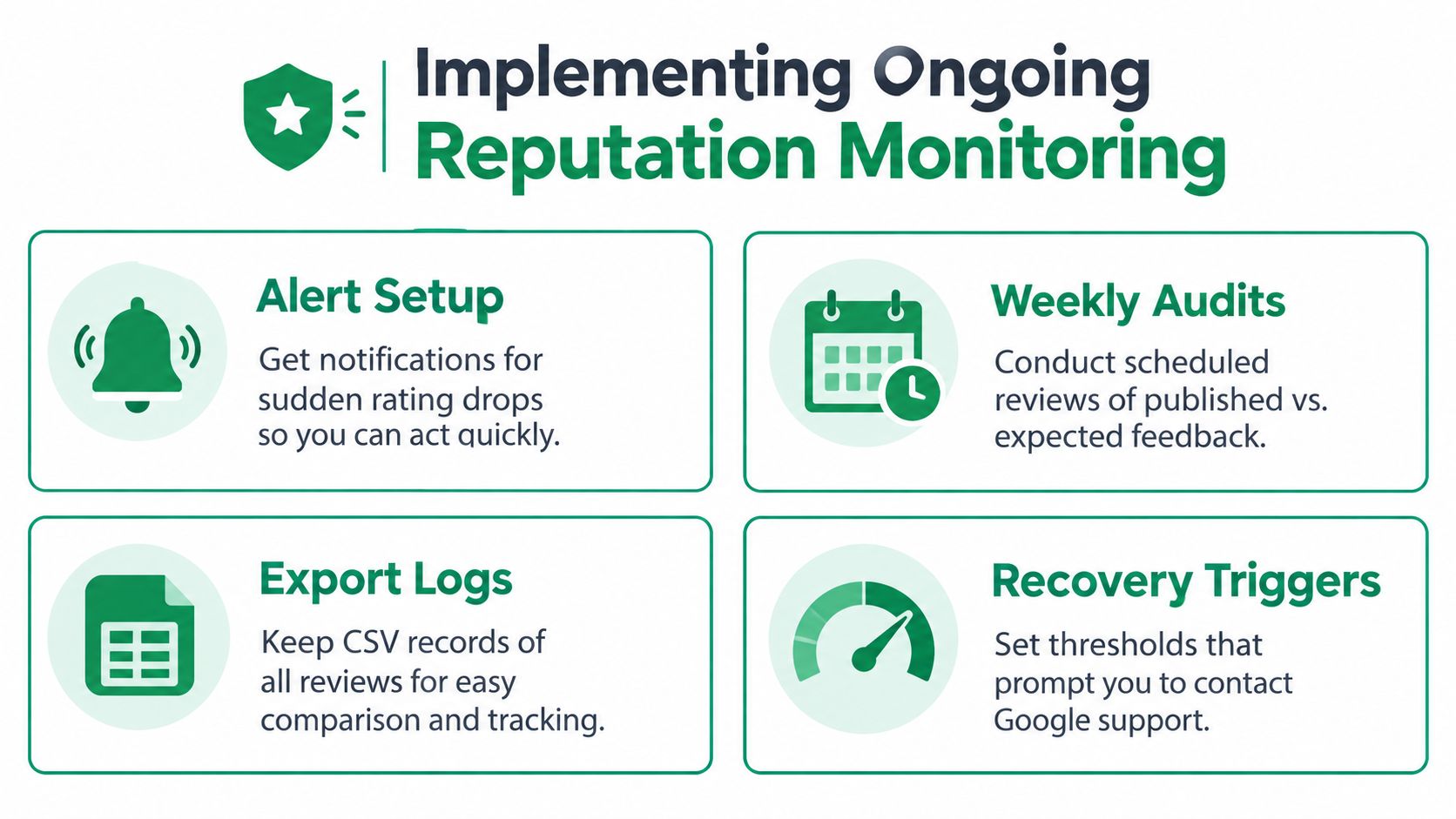
Use a simple monitoring rhythm
Keep one record per location, with fields for the review count, average rating, latest review date, reviewer name, star rating, text, response status, and screenshot location. Add a note whenever a listing is merged, renamed, suspended, transferred, or managed by a new agency.
A workable cadence looks like this:
- Alert setup: Notify the responsible manager when the rating or count changes unexpectedly.
- Weekly audit: Compare the visible review list with the previous snapshot and record missing entries.
- Export logs: Store review text and dates in a controlled spreadsheet or export file so later comparisons don't depend on Google's current display.
- Recovery triggers: Open an investigation when several reviews disappear together, when new reviews stop publishing, or when a repeated acquisition pattern appears.
Use the alert as a prompt to investigate, not as proof of a violation. A count change may reflect removal, a delayed transfer, or a display inconsistency. Check the profile manually, compare the ledger, and test whether new legitimate reviews continue to appear.
Make monitoring part of local SEO operations
Assign ownership. A marketing agency might maintain the ledger while the location manager verifies customer context, but someone must be responsible for preserving screenshots and escalating anomalies. The process should also include a monthly review of solicitation scripts, staff training, agency access, and any incentives connected to customer feedback.
AI Tools for Local SEO is one directory that organizes software for local search visibility, Business Profile optimization, review management, monitoring, and reporting. Treat any platform as an operational aid, not a substitute for policy review or evidence judgment.
The durable strategy is simple: earn authentic feedback steadily, preserve your own records, and investigate patterns before asking Google to decide what happened.
If reviews are missing now, start today with the profile snapshot and evidence log. Then audit the acquisition process, submit one structured support request, and establish a recurring review-monitoring routine so the next disappearance becomes a documented event rather than a mystery.
Contact your local SEO or reputation-management lead today and ask them to complete a Business Profile snapshot, identify every missing review, and audit the request process for incentives, gating, duplicate wording, shared devices, and clustered submissions. Bring that evidence to Google through the missing-review workflow, and keep the ledger active after the case is closed.