Conversion optimization is the structured process of increasing the share of website visitors who complete a desired action. Many sites convert only around 2.35% to 2.9% of visitors on average, while the global average across industries is reported near 3.68%, so a small gain can create a much larger business impact when your traffic is already established (ReachLabs conversion optimization benchmarks).
That's the central idea behind conversion rate optimization, or CRO. You're not automatically trying to attract more people. You're improving the path for the people who already arrive, helping more of them call, book, buy, submit a form, or take another action that matters to your business.
For a local company, the work is more nuanced than raising one website-wide percentage. The visitor searching for “emergency plumber near me” may want a phone call immediately. Someone comparing dental practices may want to review services first, while another visitor may be ready to request directions. Effective CRO starts by deciding which action best matches each type of intent.
What Conversion Optimization Means
Conversion optimization is a repeatable process for increasing the percentage of visitors who complete a defined goal. That goal could be a purchase, demo request, signup, phone call, booking, contact form submission, or directions request. The right conversion depends on both your business model and what the visitor wants to do.
The basic calculation is:
Conversion rate = (conversions ÷ visitors) × 100
Suppose a local service website receives 2,000 monthly sessions and generates 40 inquiries. Its conversion rate is 2%. If a focused improvement raises inquiries to 60 from the same traffic, the rate reaches 3%. The business gains 20 additional inquiries without buying more visits.
CRO matters when a business already invests in SEO, paid search, social media, or local listings. Acquisition brings people to the site. Optimization helps more of those visitors complete useful actions.
A website can support several micro-conversions at once: calls, forms, bookings, and requests for directions. Treat them as competing priorities, not interchangeable clicks. A person searching for “emergency plumber near me” may be ready to call, while someone comparing dental practices may first review services. Local search intent should determine which action receives the clearest placement and the least friction.
Practical rule: Don't ask only, “How do we increase our conversion rate?” Ask, “Which visitor action creates the most useful business outcome?”
Industry comparisons show that sites can produce very different results. Some sites sit around 2.35% to 2.9%, while the top 25% reach about 5.31% or higher and the top 10% can exceed 11.45% (ReachLabs industry benchmarks). These figures are reference points, not targets every local business can apply directly. Intent, offer clarity, friction, traffic source, and page experience all affect performance.
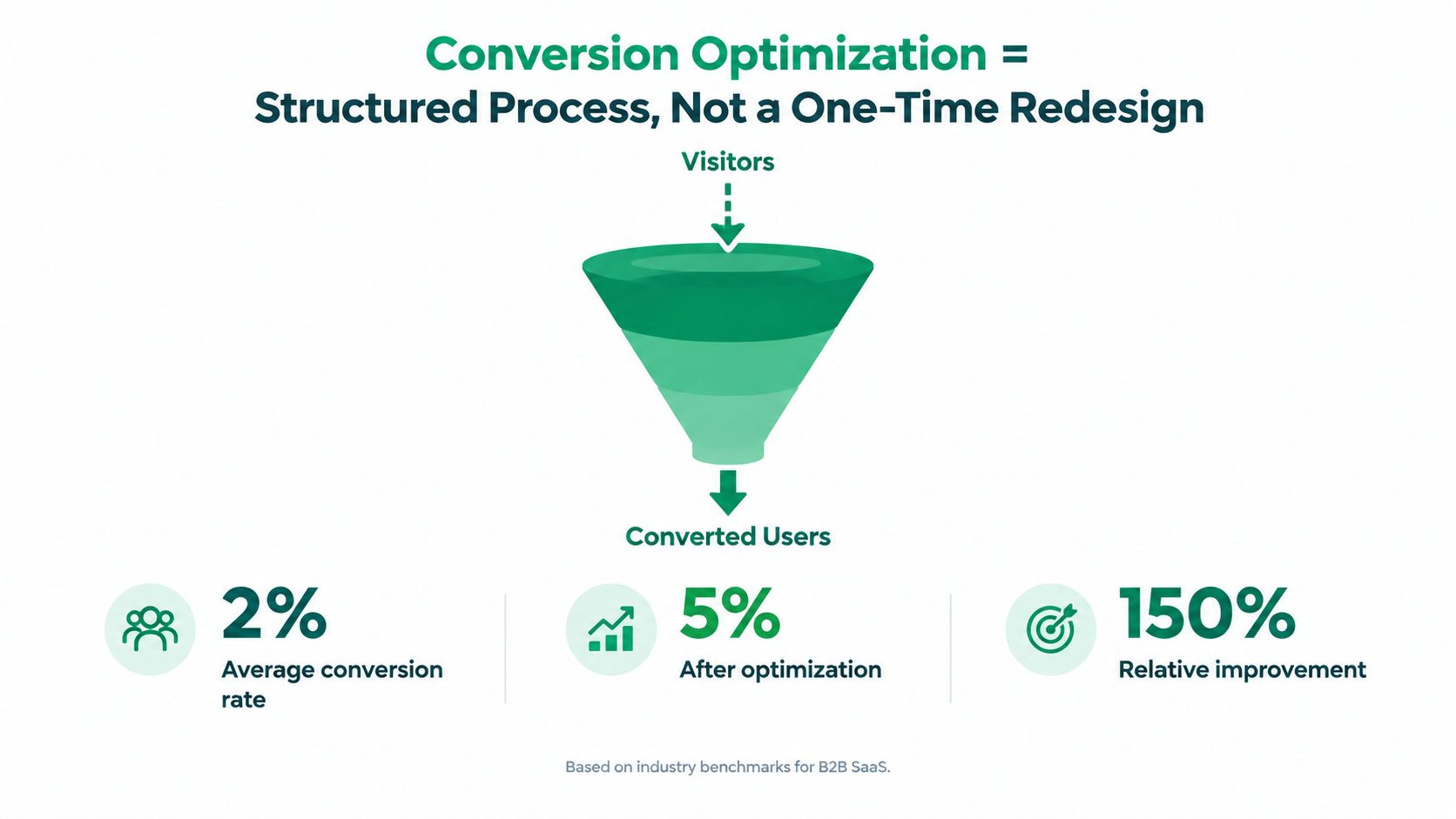
CRO isn't a one-time redesign
A redesign changes the site. CRO creates a learning system around it. A polished page can still hide the call to action, confuse visitors, or make mobile users work too hard to contact the business.
Unbounce's benchmark analysis covered 41,000 landing pages, 464 million pageviews, and 57 million conversions, with a median landing-page conversion rate of 6.6% across industries (DesignRush summary of CRO statistics). Measurement gives marketers a way to compare traffic sources, locate weak points, and test focused changes.
For terminology and mechanics, Netco Design's guide to CRO basics offers a useful introduction. The working sequence is straightforward: define the action, record the baseline, identify friction, make one focused change, and observe the result.
The Core Metrics That Drive Every CRO Decision
A conversion rate can look healthy while the business still loses money. Local owners need three connected metrics to judge whether an optimization is commercially useful: conversion rate, customer lifetime value, and customer acquisition cost.
Conversion rate tells you how efficiently a page turns visitors into actions. Customer lifetime value, or LTV, estimates what a converted customer is worth across repeat purchases, maintenance visits, referrals, renewals, or a longer contract. Customer acquisition cost, or CAC, captures what the business spends to acquire that customer through advertising, sales effort, agency fees, content, or other marketing work.
Consider a plumber. If the site converts at 2%, each customer has an LTV of 200 and CAC is 50, the basic economics may leave room for overhead and profit. If the same 2% conversion rate produces an LTV of 80 against a CAC of 60, the business may be operating with very little margin even though the conversion number hasn't changed.
| Scenario | Conversion Rate | Customer Lifetime Value | Acquisition Cost | Outcome |
|---|---|---|---|---|
| A | 2% | 200 | 50 | Potentially healthy margin before overhead |
| B | 2% | 80 | 60 | Narrow margin and possible loss after overhead |
| C | Improved rate | Higher repeat value | Controlled acquisition cost | Stronger economics if lead quality holds |
The figures in this table are an illustrative model, not an industry benchmark. They show why a higher rate isn't automatically a win. If a new form attracts more low-intent submissions but fewer profitable jobs, the dashboard may improve while the owner's calendar and bank account don't.
Choose the conversion with economic value
A useful CRO backlog ranks opportunities by business value, intent strength, confidence in the diagnosis, and ease of measurement. A booking request may be more valuable than a newsletter signup. A qualified phone call may matter more than a generic form completion. A direction request may be the critical step for a physical location, even though it doesn't immediately reveal revenue.
Use the conversion whose value justifies the work. Before changing a page, record whether the action leads to qualified customers, how the team handles it, and whether the business can connect it to revenue.
For additional context on measuring conversion performance, you can check Landra's conversion data. If you need a practical way to connect marketing spend with outcomes, use this guide on how to compute conversion costs alongside your analytics and call records.
A/B Testing, UX Changes, and Landing Page Tweaks Compared
CRO techniques solve different problems. Treating them as interchangeable creates wasted effort, especially for a local business with limited traffic and a small marketing team.
A/B testing sends visitors to two versions of a page or element and compares the selected outcome. It's useful when you have enough relevant traffic to distinguish a real behavioral difference from normal variation. A test might compare two headlines, two form layouts, or two calls to action while keeping other conditions consistent.
UX changes address deeper usability problems. They can include repairing a broken mobile flow, improving navigation, clarifying service categories, fixing accessibility issues, or removing unnecessary steps. These changes often require judgment and user research because a business shouldn't leave an obvious obstacle in place to wait for a formal experiment.
Landing page tweaks target a specific audience or campaign. A page for “same-day HVAC repair” should make that service, location, urgency, and contact path obvious. The work may involve rewriting the headline, matching the page to the search query, tightening the form, or placing credible proof near the decision point.
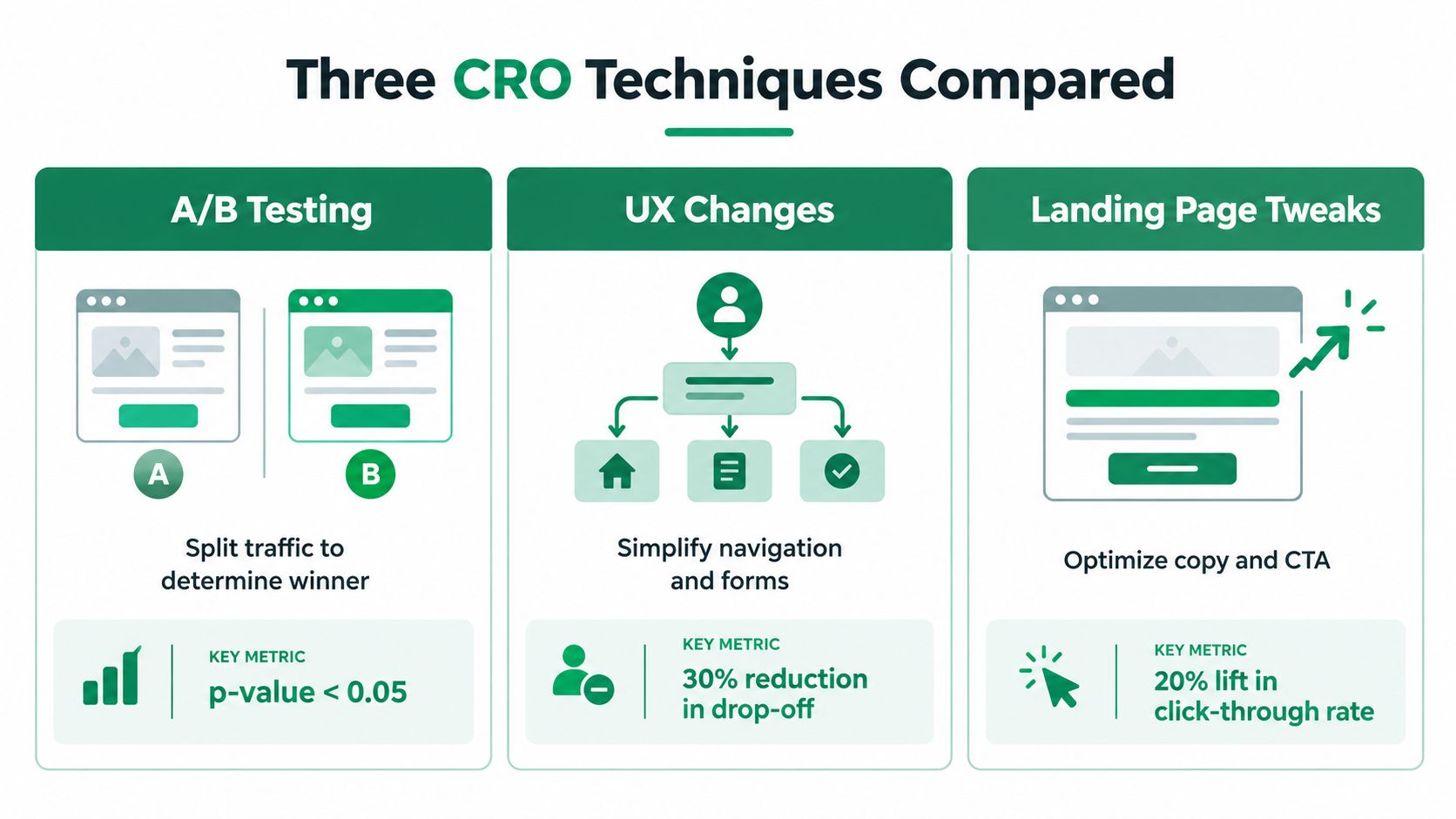
Match the method to the problem
Use three questions to choose the right approach:
- Traffic: Can the page support a controlled comparison, or will the test produce too little evidence to guide a decision?
- Depth: Is the problem a small message mismatch, or does the entire navigation and mobile journey create friction?
- Targeting: Does the page serve one clear intent, or does it combine several audiences with different needs?
A page with a broken phone link needs repair, not a button-color experiment. A service page with strong traffic and unclear messaging may benefit from a focused landing-page revision. A high-traffic page with two credible headline options may be a candidate for A/B testing.
The core method has a strong measurement foundation. In a benchmark program covering 1,055 A/B tests, the median control conversion rate was 4.6%, the median lift among winning tests was 1.88%, and the median revenue-per-visitor lift was 2.77% (ConversionTeam A/B testing statistics). These results illustrate why small gains can matter at scale, but they don't guarantee a particular result for your page.
A practical sequence is to fix obvious UX failures first, align the landing page with intent next, and use A/B testing where traffic and measurement make the comparison credible. E-commerce A/B testing basics from Tagada can help teams understand test structure before applying it to product or service pages. For local-focused ideas, see how to improve conversion rates.
The CRO Workflow From Research to Repeatable Wins
Small teams don't need a full analytics department to begin. They do need a disciplined way to separate observed friction from personal preference.
Research
Start with evidence from several places. Analytics shows where visitors enter and leave. Heatmaps can reveal whether people interact with the intended call to action. Session recordings may show repeated hesitation, dead clicks, or mobile scrolling that stops before the form. Search query reports reveal the language visitors use, while customer call logs expose questions the page hasn't answered.
A local roofing company might notice that visitors reach its estimate page but abandon before submitting. Recordings could show that the form appears below a long block of copy. Call logs might reveal that customers repeatedly ask whether emergency work is available. Those observations are more useful than a general feeling that “the page needs energy.”
Hypothesize
Turn each observation into a testable statement. A useful hypothesis identifies the audience, the friction, the change, and the expected outcome.
Hypothesis format: If we make the emergency service option visible before the form, qualified visitors will be more likely to call or request an estimate because the page will answer their immediate concern.
Rank the backlog by expected business value, confidence in the diagnosis, implementation effort, and measurement quality. Don't treat every idea as equally important. A clear mobile contact failure usually deserves attention before a speculative visual adjustment.
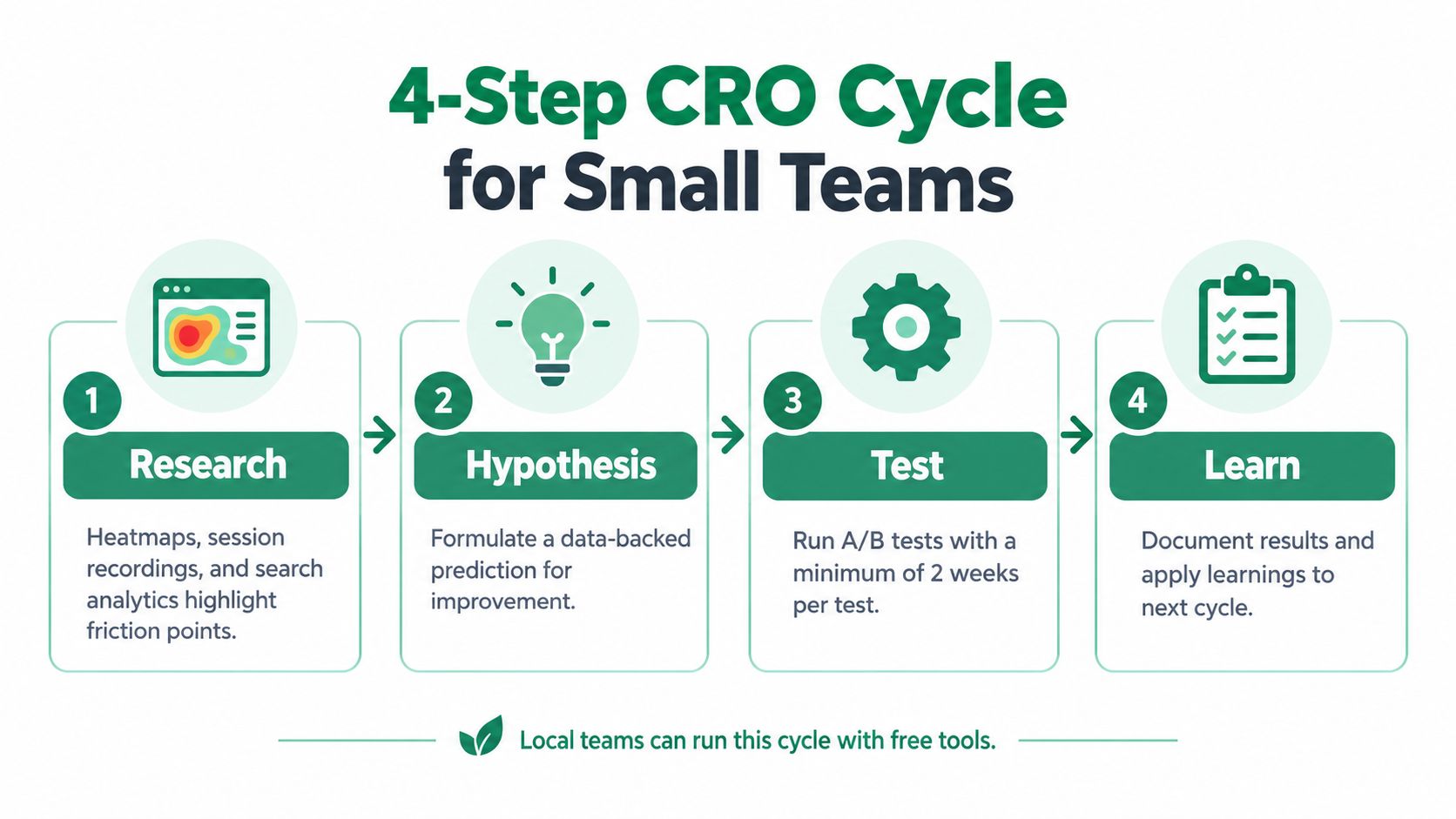
Test and learn
Choose one meaningful variable when possible. Split traffic between the original and changed experience, define the primary conversion before launch, and establish the evidence threshold you'll use to make a decision. A test that changes the headline, offer, layout, form, and proof at the same time may produce a different result, but it won't tell you which change caused it.
Sample size should be adequate for the page's traffic and baseline. Small local sites may need to prioritize high-confidence UX improvements and use testing selectively rather than force every change into an experiment.
Record the result whether the variant wins, loses, or remains inconclusive. Document the audience, device, traffic source, change, primary metric, secondary effects, and next question. Over time, that record becomes a practical library of what your customers respond to, which is more valuable than collecting isolated “best practices.” For research specific to a service area, use this resource on local market research.
Choosing the Right Conversion to Optimize for Local Traffic
A local business rarely has one meaningful conversion. It has several actions, each reflecting a different level of intent and a different path to revenue. CRO for local traffic works best as a priority system for these micro-conversions, rather than a search for one website-wide percentage.
A phone call often signals urgency or a need for reassurance. A booking click suggests that the visitor understands the offer and wants to schedule an interaction. A form submission can collect details for quoting or follow-up. A directions request may matter most for a restaurant, clinic, showroom, or retail location. Chat starts, email clicks, and newsletter signups can also contribute, depending on how the business responds and follows up.
The right priority follows the visitor's situation, not a generic website template.
| Micro-Conversion | Search Intent Stage | Typical Device | Relative Value |
|---|---|---|---|
| Phone call | Ready to discuss or buy | Mobile | High for urgent services |
| Contact form | Comparing or requesting a quote | Desktop and mobile | High when qualification matters |
| Booking click | Ready to schedule | Desktop and mobile | High when appointments are the core outcome |
| Directions request | Ready to visit | Mobile | High for location-based businesses |
| Chat start | Needs a quick answer | Mobile and desktop | Depends on response quality |
| Newsletter signup | Early research | Desktop and mobile | Usually longer-term value |
These device patterns are directional, not universal. A mobile visitor may prefer a form, while a desktop visitor may call. The practical question is whether the page makes the likely action easy at the moment of intent. A search for “emergency plumber” points toward a call, while “dentist near me” may lead to directions, booking, or a call depending on the visitor's next concern.
Build an intent-to-action map
Organize local search journeys into practical stages:
- Discovery: The visitor is learning which businesses serve a need. Educational content, service categories, and low-commitment contact options can help.
- Comparison: The visitor is evaluating providers. Clear services, availability, location details, reviews, pricing context, and a visible inquiry path reduce uncertainty.
- Ready to buy: The visitor wants immediate action. Prominent call, booking, quote, or directions controls should match the query and device.
- Navigation: The visitor already knows where to go. Directions, opening information, parking details, and a tap-friendly contact path may matter more than lengthy persuasion.
Rank each action with three tests: business value, intent strength, and measurement reliability. Business value asks whether the action can lead to profitable work. Intent strength asks how close the visitor appears to taking that next step. Measurement reliability asks whether the business can record the action and distinguish a qualified inquiry from an accidental tap.
A direction request can be difficult to connect directly to revenue, yet it may be the best primary action for a physical store. A call can be highly valuable, but only if the business records its source and assesses whether the inquiry is qualified.
Local CRO therefore means choosing the action that best connects immediate search intent with the business's profitable next step. Optimize that priority first, then evaluate supporting actions instead of forcing every micro-conversion into the same target.
A Local Service Business Conversion Test in Practice
Consider a single-location dental practice receiving steady traffic from its Google Business Profile and local search pages. Its contact form completes at 2.1% in the starting scenario, and the practice wants more qualified booked appointments rather than a larger count of unqualified messages.
The team suspects the offer isn't the main obstacle. The form asks for too much information before the visitor can take the next step. The test changes the form from seven fields to three and adds a click-to-call button above the fold. The hypothesis is that reducing effort will increase completed inquiries, while the call option will better serve visitors who want immediate reassurance.
The practice runs the original page against the revised page, defines form completions as the primary measured action, and tracks calls separately. The example is designed to show the decision process, not report a verified case study or guaranteed performance outcome.
What the team learns
The revised page produces a modest increase in form completions and a larger increase in phone calls during the test period. The combined result matters more than the form rate alone because the practice's real objective is qualified appointments.
The next backlog contains two focused questions:
- Does placing appointment availability near the primary call to action improve booking quality?
- Do visitors from mobile search respond better to a direct booking path than to the form?
The team should verify appointment outcomes, not stop at clicks. If calls rise but staff can't answer them, the page change may expose an operational problem rather than solve the revenue problem. CRO includes the handoff after the click.
Common Misconceptions and Your First 90 Days of CRO
More traffic doesn't automatically repair a weak conversion path. If qualified visitors can't understand the offer, trust the business, or complete the next step, additional visits may create more missed opportunities.
A redesign doesn't guarantee better performance either. New colors, layouts, and imagery can introduce friction if the team hasn't identified what visitors struggle with. CRO isn't reserved for companies with dedicated specialists. A local owner can begin with existing analytics, call records, one clear hypothesis, and a controlled change.
A practical first 90 days
Days 1 to 30, research and baseline
- Instrument actions: Track forms, calls, booking clicks, directions, and other meaningful local actions.
- Map paths: Review how visitors move from search or business listings to service pages and contact points.
- Find friction: Compare behavior by device, traffic source, service, and location.
Days 31 to 60, test and iterate
- Choose one page: Start with a high-intent service or location page.
- Write one hypothesis: Connect a specific friction point with one proposed improvement.
- Run one controlled change: Keep the primary conversion and evaluation criteria clear.
Days 61 to 90, scale and document
- Review quality: Connect leads and calls with booked work where possible.
- Document learning: Record what changed, who saw it, and what happened.
- Prioritize the next action: Use the evidence to select the next high-value test or UX repair.
Industry data shows that CRO performance varies widely, and benchmark summaries associate simpler pages with stronger conversion outcomes in some datasets, including 9.4% for pages with seven or fewer elements versus 2.8% for pages with more than 35 elements (Digital Applied conversion benchmarks). Treat that as directional evidence, not a universal design rule. Your visitors and business model decide which changes deserve priority.
The first move this week is straightforward: choose one important local page, identify its primary and secondary conversions, review the actual visitor path, and write a testable hypothesis. Then make one measured improvement and use the result to decide what happens next.
Audit your highest-intent local landing page this week. Track its calls, forms, bookings, and directions separately, choose the conversion with the clearest business value, and run one focused CRO improvement instead of a wholesale redesign.